Why Choose Letslist.homes Real Estate Brochure Maker?

Easy uploads feature icon for real estate image enhancer
Instant Creation

Just provide property information and AI will create your brochure.

Advanced editing tools icon for real estate image enhancer
Customizable Templates

Select either professional templates of real estate brochures or create your own images.

Extensive visual library icon for real estate image enhancer
AI-Driven Design

Get beautiful layouts to your listings.

Instant download feature icon for real estate image enhancer
Marketing Ready

Ideal to publish in print or electronic copies.

Instant download feature icon for real estate image enhancer
For Realtors & Agencies

The ultimate real estate agent marketing tool.

How It Works

Step 1: Upload real estate photos icon
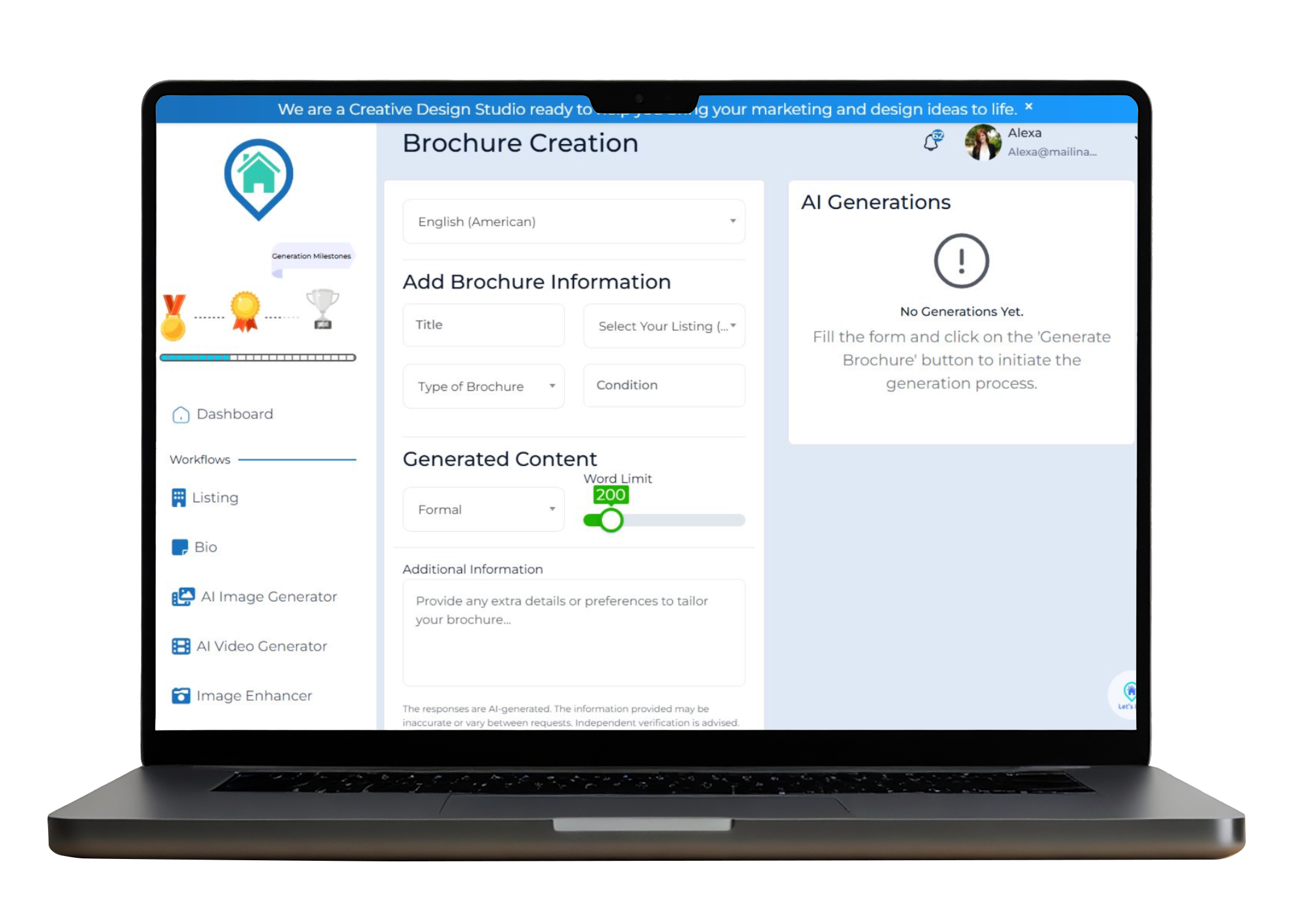
Select Language

Select a language for your brochure in such a way that it suits your target audience perfectly.

Step 2: AI-powered photo editing icon
Add Brochure Information
  • Insert the Name of your brochure.
  • Choose your Property Listing (Optional).
  • Select the Type of Brochure and the state of the property.
Step 3: Download high-quality real estate images icon
Generate Content
  • Select the Content Style (Formal, Friendly or Casual).
  • Indicate the word count of the brochure copy.
  • Add Additional Information or preferences to personalize the brochure.
Step 3: Download high-quality real estate images icon
Enhance Images
  • Post pictures of your property or use stock images.
  • Image Enhancer allows customization of images and fitting of templates.
Step 3: Download high-quality real estate images icon
Generate & Download

Click “Generate Brochure”.

Your AI-powered brochure is now ready to download in real-time to be printed or shared electronically.

Benefits for Real Estate Professionals

Sell faster with enhanced real estate images icon

Save hours with an AI-powered brochure tool built for real estate.

Save time and money with real estate photo editing icon

Maintain consistent branding across every listing.

High-quality real estate listings icon

Impress clients instantly with polished, professional brochures that help close deals faster.

Improve real estate marketing with enhanced images icon

One of the elements of an overall real estate content creation tool that also produces property descriptions and social media posts.

Professionally enhanced real estate property photo

AI-Powered Brochure Creation for Every Real Estate Professional

Real estate agents icon for image enhancer tool
Individual Realtors

Rapidly develop marketing texts on new listings.

Property managers icon for real estate image enhancer
Agencies Teams

Design brochures in a standardized way across agents.

Real estate photographers icon for image enhancer tool
Property Developers

Display brochures of our polished projects.

Who Can Use This Tool?

AI Brochure Generator in Real Estate is aimed at each specialist of the property market:

Real Estate Agents

Designing of quality brochures quickly to impress clients and display listings.


Real Estate Agencies and Teams

Have a consistent and branded style in all the marketing materials.


Property Developers

New projects-New designs of property real estate brochures.


Marketing Professionals

Scale content creation and provide effective tools of real estate marketing with the help of AI.


Brokerages

Standardize brochures when using several agents to build a unified brand.


Be it selling one residential or promoting a whole development, Letslist.homes offers an easy, quick, and professional way of brochure creation.

Start Creating Today

Stop wasting time on brochure design. Using Letslist.homes, it is possible to produce beautiful, bespoke brochures within a few clicks.

Frequently Asked Questions

The Brochure Creation tool allows you to generate professional real estate brochures using AI. Simply fill in the property details, choose your preferred style, and let the AI create a ready-to-use brochure within seconds.

Select your preferred language.

Add the brochure information such as Title, Type of Brochure, Condition, and optionally select a listing.

Choose the Content Style (e.g., Formal).

Set the Word Limit using the slider.

Add any extra details under Additional Information for more personalization. Finally, click the Generate Brochure button to initiate the process.

The Word Limit slider lets you control the length of your brochure content.

Yes, after the content is generated, you can review and make edits before finalizing or downloading your brochure.